OpenClaw One Click Installation
Self-host your AI assistant on a VPS with one click. Compare providers, deploy the Gateway in minutes, and connect it to WhatsApp, Telegram, and Discord. No coding required.
What Is OpenClaw? AI Agent Framework Explained
OpenClaw is a personal AI assistant you run on your own hardware. Written in TypeScript and installed with a single npm command, it spins up a Gateway process that connects your AI to the messaging channels you already use — WhatsApp, Telegram, Discord, Slack, and 20 more.
The Gateway is the control plane. It routes inbound messages from any connected channel to your AI agent, runs the agent loop, and delivers the response back. One process, every platform, no SaaS middleman reading your data.
How OpenClaw Automates Work
OpenClaw doesn’t just answer questions — it speaks, listens, and renders. On macOS, iOS, and Android, it handles voice input natively and pushes a live Canvas surface you control from any device. Your agent can call APIs, run scheduled tasks, and deliver results straight to the chat app where you already are.
Automation runs through the Gateway scheduler: cron jobs fire on a schedule, hooks react to events, and standing orders give your agent permanent operating authority for recurring work. Task Flow orchestrates multi-step agent runs without manual babysitting.
Why Builders Choose OpenClaw
- 24+ messaging channels — WhatsApp, Telegram, iMessage, Signal, Matrix, Teams, and more
- Voice + Canvas — speak to your agent, see live visual output on any device
- 25+ LLM providers — OpenAI, Anthropic, Bedrock, Mistral, xAI, Qwen, OpenRouter
- ClawHub marketplace — install community skills and MCP servers in seconds
- openclaw onboard — interactive CLI wizard sets up Gateway, channels, and skills
- MIT licensed, 381K GitHub stars, built by Peter Steinberger and 30+ contributors
npm install -g openclaw@latest && openclaw onboard
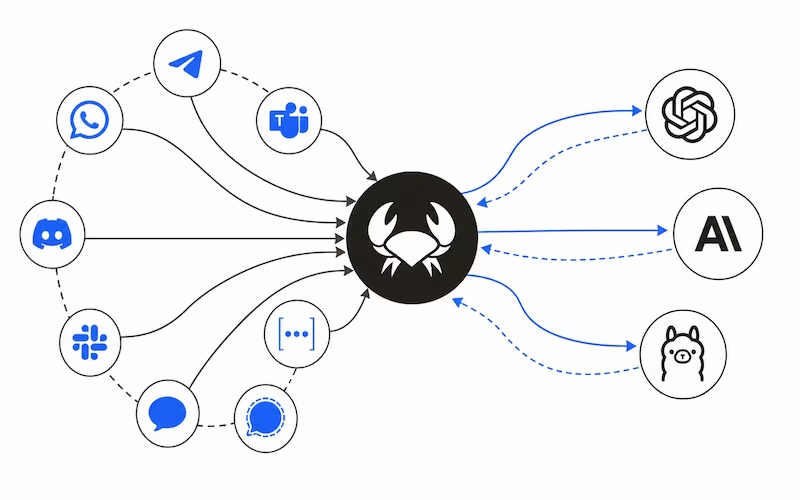
Connect OpenClaw to 24+ Messaging Platforms
One Gateway process routes messages from every channel to your AI agent. Configure multiple platforms and OpenClaw handles routing automatically — no separate bots to manage.
Channels run simultaneously. Configure as many as you need — OpenClaw routes per chat automatically. DM pairing and allowlists are enforced on every channel for security. Group chat is supported across Discord, iMessage, Matrix, Teams, Signal, Slack, Telegram, and WhatsApp.
Why Self-Host OpenClaw? Deploy Autonomous AI Agents
Self-hosting OpenClaw puts the Gateway, your channels, and your API keys on infrastructure you control — no SaaS middleman reading your conversations or capping your usage.
Total Privacy
Your Gateway, channel credentials, and conversation history never leave your VPS. OpenClaw’s personal assistant trust model means one trusted operator per gateway — no shared-tenant risk. DM pairing and allowlists are enforced on every channel by default.
Full Control
Choose from 25+ LLM providers — OpenAI, Anthropic, Bedrock, or local models via Ollama — and switch anytime. ClawHub plugins and skills you install stay under your control, not a platform’s marketplace policy. The openclaw onboard wizard configures your Gateway daemon as a systemd or launchd service that stays running.
Predictable Cost
Flat monthly VPS pricing from $4.25 to $24.00 beats per-message SaaS billing. No surprise invoices, no usage spikes. Your only variable cost is the LLM provider you already use — and local models via Ollama cost nothing extra.
No Limits, No Lock-in
One Gateway process runs 24/7 across all 24+ messaging channels with no rate limits or usage caps. Companion apps on macOS, iOS, Android, and Windows connect to your self-hosted Gateway from anywhere. Switch VPS providers anytime — your config and workspace are portable.
What Can You Do with OpenClaw?
One Gateway, every channel, any model. Here’s what builders actually use OpenClaw for.
24/7 Personal Assistant
Your Gateway runs as a systemd daemon and never sleeps. Message it from WhatsApp at midnight, Telegram at lunch, Discord after work — the same agent picks up the conversation on every channel. No context lost between platforms.
Voice-Controlled Automation
Speak to your agent on macOS or iOS — it listens, responds with voice, and pushes a live Canvas surface to your screen. Ask it to run tasks, fetch data, or trigger automations without touching a keyboard.
Multi-Channel Notifications
Connect 24+ messaging platforms and let your agent route alerts where you actually read them. Server down? Ping on Telegram. Build complete? Notify the Discord channel. One Gateway, every platform, automatic routing per chat.
Scheduled Research Agent
Set a cron job to research a topic overnight. Your agent gathers sources, summarizes findings with any LLM you choose, and delivers the report to your WhatsApp or Slack in the morning. Standing orders keep it running without reconfiguration.
Code Review and DevOps Bot
Hook OpenClaw into your GitHub or GitLab workflow. The agent reviews PRs, flags issues, and posts comments back to the right channel. Task Flow orchestrates multi-step reviews without manual babysitting.
Home Automation via Chat
Connect MCP servers for your smart home devices and talk to them through any messaging app. “Turn off the lights” on Telegram, “set thermostat to 21” on WhatsApp — your agent routes the command through the Gateway.
What OpenClaw Can Do
Beyond chat — voice, live visual surfaces, companion apps, automation, and a plugin marketplace that keeps your agent growing.
Voice and Canvas
Speak to your agent and hear responses on macOS, iOS, and Android. Push a live Canvas surface to any device — your agent renders visual output you control from anywhere.
Companion Apps
macOS menu bar app with voice wake and push-to-talk. iOS and Android nodes pair over WebSocket. Windows Hub offers native tray, chat, and local MCP mode. All connect to your self-hosted Gateway.
ClawHub Marketplace
Install community skills and MCP servers from ClawHub with vetted org publishers. New skills ship through the marketplace, not bundled into core — your Gateway stays lean.
MCP Server and Client
OpenClaw speaks the Model Context Protocol both ways — expose your agent as an MCP server, or connect to external MCP servers as tools. Pragmatic integration without duplicating existing paths.
Automation System
Scheduled cron jobs fire on a timer. Hooks react to events. Standing orders give your agent permanent authority for recurring work. Task Flow orchestrates multi-step agent runs end to end.
25+ LLM Providers
Switch between OpenAI, Anthropic, Amazon Bedrock, Mistral, xAI, Qwen, Z.AI, OpenRouter, or local models via Ollama — mid-conversation if needed. Model failover rotates auth profiles automatically.
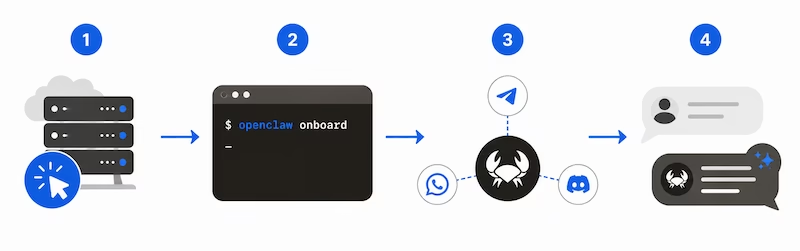
OpenClaw One-Click Install — Setup in 4 Steps
No coding required. Pick a VPS provider, click install, and the OpenClaw Gateway is running in minutes. The onboard wizard handles provider auth, channel setup, and daemon configuration automatically.
Choose your VPS from the comparison table below
Click install — the provider deploys OpenClaw and starts the Gateway
Run openclaw onboard — the wizard walks you through channels and model setup
Send a message — your agent answers on WhatsApp, Telegram, Discord, or any connected channel
Best VPS Providers for OpenClaw One-Click Hosting
Five providers offer one-click OpenClaw deployment. Here’s what makes each one different.
Official one-click OpenClaw app with an intuitive hPanel interface. Fastest path from signup to a running Gateway — the installer handles npm, Node.js, and daemon setup automatically.
- 4GB RAM, 50GB NVMe storage
- 4TB monthly bandwidth
- Official one-click OpenClaw template
- 30-day money-back guarantee
Fully managed OpenClaw hosting — no terminal, no SSH, no Docker required. Telegram and WhatsApp channels are pre-configured out of the box. Backed by 280+ reviews.
- 4GB RAM, 80GB SSD storage
- Unlimited bandwidth
- Telegram and WhatsApp included
- Deploys in 5 minutes
Generous resources at the lowest price. Contabo gives you 8GB RAM and 100GB storage for less than competitors charge for half — ideal for running multiple agent sessions and voice processing.
- 8GB RAM, 100GB SSD storage
- 32TB monthly bandwidth
- Choice of server locations
- Plesk/cPanel available
Deploy from a community template with usage-based pricing. Railway is built for developers who want Git-based deploys, environment variables, and granular resource scaling.
- 4GB RAM, 20GB storage
- Usage-based bandwidth
- GitHub integration
- Environment variable management
Affordable VPS with OpenClaw listed in their marketplace. Quick provisioning gets you to the onboard wizard fast — straightforward setup with no unnecessary extras.
- 4GB RAM, 50GB SSD storage
- Unlimited bandwidth
- OpenClaw in marketplace
- Fast provisioning
Compare OpenClaw VPS Hosting — Pricing, Specs, Performance
Side-by-side comparison of pricing, specs, and features. All providers support one-click OpenClaw Gateway deployment.
| Provider | Starting Price | RAM | Storage | Bandwidth | One-Click | Best For | Action |
|---|---|---|---|---|---|---|---|
Hostinger |
$6.99/mo | 4GB | 50GB NVMe | 4TB | ✓ | Best overall value | Get Now |
xCLOUD |
$24.00/mo | 4GB | 80GB SSD | Unlimited | ✓ | Fully managed | Get Now |
Contabo |
$4.25/mo | 8GB | 100GB SSD | 32TB | ✓ | Most RAM for the price | Get Now |
Railway |
$5.00/mo | 4GB | 20GB | Usage-based | ✓ | For developers | Get Now |
Cubepath |
$5.00/mo | 4GB | 50GB SSD | Unlimited | ✓ | Cheapest option | Get Now |
OpenClaw vs ChatGPT vs Claude: What’s the Difference?
Three AI assistants, three very different approaches. Here’s how they compare on hosting, channels, privacy, and cost.
Runs on your own VPS. Your data, API keys, and conversation history never leave your server. One Gateway process routes messages from 24+ channels to any LLM you choose.
- Self-hosted on your VPS — MIT licensed
- 24+ messaging channels
- Voice + Canvas on macOS/iOS/Android
- 25+ LLM providers, switch anytime
- Flat $4–24/mo VPS cost
- ClawHub plugin marketplace
- Cron jobs, hooks, Task Flow automation
Cloud-only SaaS by OpenAI. All conversations go to OpenAI servers. Works through web interface or API — no self-hosting, no multi-channel routing.
- Cloud-only — data on OpenAI servers
- No self-hosting option
- Web interface + API
- Voice on mobile app
- No 24+ channel routing
- $20/mo for Plus
- No plugin marketplace
Cloud-only SaaS by Anthropic. Same limitations as ChatGPT — no self-hosting, no multi-channel routing. Streamlined interface but no control over your data.
- Cloud-only — data on Anthropic servers
- No self-hosting option
- Web interface + API
- No voice or Canvas
- No 24+ channel routing
- $20/mo for Pro
- No plugin marketplace
Learn OpenClaw — Build Autonomous AI Agents
Deploy 24/7 digital employees that actually get work done. This course covers VPS security, local AI with Ollama, Claude and GPT integration, Docker, AI automation, and agentic engineering — all applied to OpenClaw. No theory-heavy lectures, just real builds from the first lesson.
What You’ll Learn
- Deploy OpenClaw securely on a VPS with proper hardening
- Run local AI models with Ollama — no per-request API costs
- Connect Claude and GPT as LLM providers for your agents
- Build agentic workflows that run autonomously 24/7
- Use Docker for isolated, secure agent environments
- Automate real tasks — research, data processing, monitoring
What You’ll Build
Autonomous AI agent systems running on your own VPS. Research assistants, automation pipelines, and always-on digital employees — not demos, but production tools you’ll use daily. By the end, you don’t just understand OpenClaw. You’ve already deployed it.
Start Learning on UdemyThe Latest on OpenClaw
Security threats, AI agent safety, and MCP integration guides — practical reads for anyone running OpenClaw on a VPS.
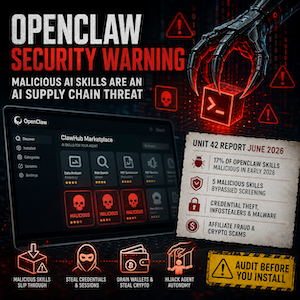
OpenClaw Security Warning
Malicious OpenClaw skills: the 17% supply chain threat you missed. You installed that helpful AI skill to analyze spreadsheets. Now it’s draining…
Read more →
AI Agent Phishing
This AI agent gave up credentials to a stranger in minutes. Here’s what your business needs to know about the experiment that should keep you up at…
Read more →
MCP: The USB-C Moment for AI
What if your AI could connect to any tool instantly? You’ve probably watched your AI assistant stumble when it needs to interact with the…
Read more →OpenClaw One-Click FAQ
Everything you need to know about self-hosting OpenClaw on a VPS.
openclaw onboard — the interactive wizard walks you through model selection, channel setup, and daemon configuration. The Gateway starts as a systemd or launchd service and stays running 24/7.openclaw security audit --fix tightens common misconfigurations.openclaw onboard wizard sets up everything else for free.~/.openclaw and your config in openclaw.json. Export those from one VPS, redeploy on another provider, and run openclaw onboard to reconnect. The process takes minutes. No lock-in, no migration fees.Start Your OpenClaw One-Click Deployment Today
Pick a VPS provider, click install, and run openclaw onboard — your Gateway is live in minutes. Or take the course and master OpenClaw from scratch.
MIT licensed · 381K GitHub stars · No lock-in · Cancel anytime