Imagine this scenario. You have spent three hours configuring your OpenClaw agent, tweaking the system prompts, connecting it to your project management tools, testing Telegram responses, and verifying that it monitors your GitHub pipelines correctly. It works beautifully, answering queries in seconds and watching for deployment failures while you code. Then you close your laptop to grab coffee and head into a two-hour strategy meeting. Absolute silence. Your agent goes dark, disconnected from the world, and utterly useless until you reopen that lid.
Here is the hard truth: running OpenClaw on your laptop works fine for testing, but the moment that lid shuts, your 24/7 automation dream dies. If you want an AI teammate that answers messages while you sleep, monitors systems while you commute, and runs automations while you vacation, you need a Virtual Private Server. With 247,000 GitHub stars and counting, OpenClaw has become one of the fastest-growing open-source projects of 2026 because it transforms raw infrastructure into intelligent, autonomous teammates. But that transformation requires infrastructure that does not take coffee breaks.
Why Your Laptop Is Killing Your AI Agent
A laptop is a consumer device designed to sleep, overheat, and travel with you. It is not infrastructure. When you migrate OpenClaw to a VPS, you purchase 99% uptime reliability, which translates to a maximum of 52 minutes of potential downtime per year. Compare that to the hours or days of silence you get from a machine that only runs when you are physically at your desk and awake.
The OpenClaw gateway itself runs surprisingly lean, requiring only 512MB to 1GB of RAM for personal use, though the official documentation recommends 2GB for comfortable headroom and stability. But the real magic happens when you pair OpenClaw with Ollama for local model hosting. On Oracle Cloud’s free ARM tier, you receive 4 ARM CPUs and 24GB of RAM, allowing you to run 7B parameter models comfortably and even quantized 13B models locally with reasonable inference speeds. Try achieving that on AWS or Google Cloud free tiers, which limit you to a measly 1GB of RAM and force you into expensive paid tiers just to run anything beyond trivial tasks.
Security Is Not a Feature You Add Later
Running a single agent for your entire team is a valid setup, but only when every user sits within the same trust boundary and the agent handles strictly business-only operations without accessing personal data. Security is not a feature you add later; it is the foundation you pour first. Do not open port 18789, which serves as OpenClaw’s gateway port, to the public internet under any circumstances. This port should remain bound to localhost or internal networks only, protected by your reverse proxy configuration.
Keep your deployment isolated on a dedicated runtime, whether that is a VPS, VM, or container, with dedicated OS user accounts that never touch personal data or browsing history. Do not sign that runtime into personal Apple or Google accounts, and never use personal browser or password-manager profiles on that server. Think of your VPS as a sterile surgical theater, not a shared family computer, because once you expose your automation infrastructure to personal credentials, you have dissolved the trust boundary that keeps your organizational data safe from cross-contamination.
Why Telegram Wins for VPS Deployments
Communication channels can make or break your OpenClaw experience, especially during initial setup when you are still proving the concept to yourself or your team. Telegram stands out as the simplest VPS-first channel because it utilizes long-polling architecture instead of webhooks. Your server reaches out to Telegram’s API periodically to check for new messages, which means you do not need to configure inbound ports, set up complex reverse proxies, or wrestle with firewall rules just to get your first message flowing from your phone to your server.
This architectural choice removes a massive barrier for beginners who want to see results immediately without becoming network engineers overnight. It just works, allowing you to focus on building powerful automations rather than debugging network connectivity issues while your agent sits idle and frustrated users wonder why the bot is not responding.
Three Paths to Production
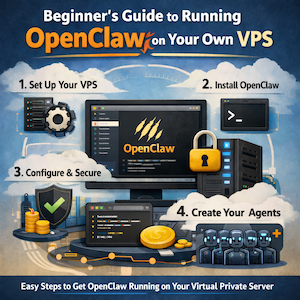
You stand at a crossroads with three distinct paths to running OpenClaw on a VPS, each demanding different trade-offs between time, money, and control. The first path is pure DIY: you provision a server, install Docker plus Ollama plus Nginx plus SSL certificates, and handle all security hardening yourself through the command line. On 1GB hosts, you will likely face memory limits where npm install gets killed by the kernel, forcing you to add a 2GB swap file or use Docker exclusively to avoid memory exhaustion. This route costs $0 monthly on Oracle Cloud’s generous free tier but demands significant technical sweat equity and patience.
The second path is the managed setup service: for $499, experienced teams handle server provisioning, implement security hardening with the RAK framework, configure curated agent skills, integrate Telegram seamlessly, and connect Google Services, delivering everything within 48 hours with 30 days of support included. The third path offers a middle ground through one-click installation providers like Hostinger, XCloud, Railway, Cubepath, and Contabo, which balance the ownership of self-hosting with the convenience of pre-configured environments that get you started in minutes rather than hours.
Maintenance Without the Migraine
Once your OpenClaw instance hums along steadily on your VPS, maintaining it requires minimal effort while preserving your entire configuration and conversation history. When updates arrive, simply run npm update -g openclaw followed by systemctl –user restart openclaw to refresh the software. Your credentials, agent settings, and channel connections remain intact throughout the process, ensuring zero downtime for your critical automations. This stability means you can set up your agent once and trust it to handle tasks for months without constant babysitting, configuration drift, or fear that a system update will break your carefully tuned workflows.
Stop treating your laptop like a data center. Choose a deployment strategy that matches your technical comfort level and budget, secure that trust boundary from day one, and finally let your AI agent work the graveyard shift while you focus on higher-level strategy and creative work.